
When shipping items for Return & Repair, it's important to accurately specify this in your shipment details and to provide necessary supporting documentation. Follow these steps to ensure your shipment includes all required information:
Steps to Specify Return & Repair:
1. Start the Quote Process:
- Begin by entering your shipment details and proceed through the quote process.
2. Navigate to the International Details Step:
- During the quote process, you will reach the International Details step.
3. Locate the Additional Details Section:
- Under the International Details step, find the Additional Details section.
4. Select the Reason for Shipment:
- In the Reason for Shipment field, click on the drop-down menu.
- Choose "Return and Repair".
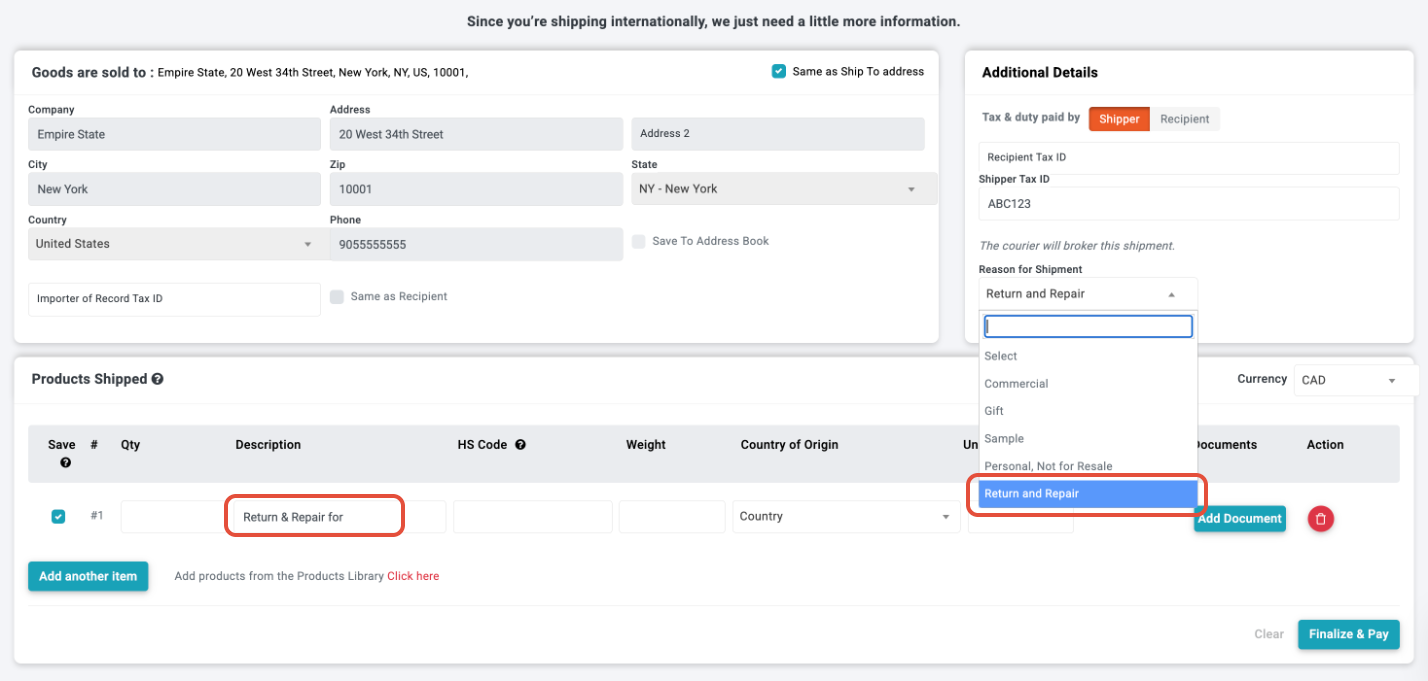
5. Complete the Product information
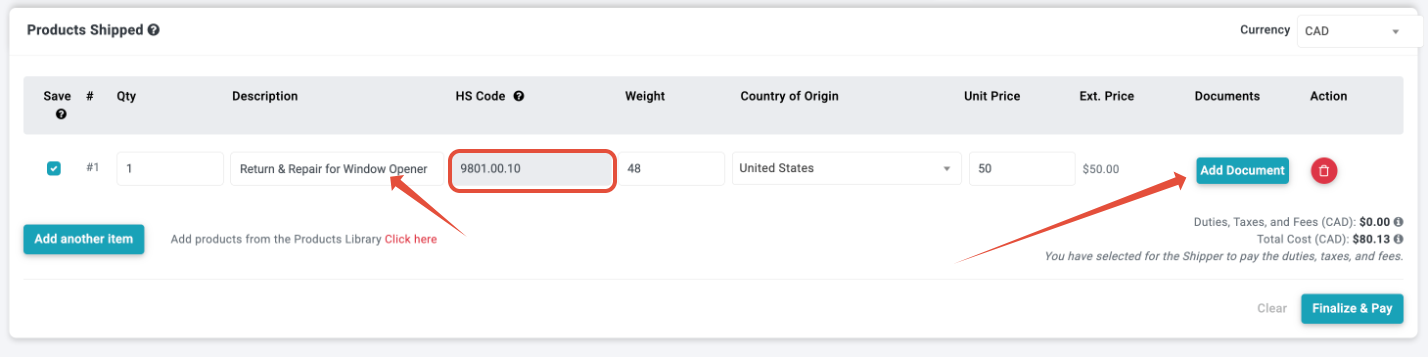
- Quantity of items - each separate product needs its own line on the commercial invoice
- Concise, clear description of the product being returned after pre-filled text
- HS Code - note for transborder shipments originating in the US/Canada, the HS code will be pre-filled
- Country of Origin
- Unit Price - current value of goods (per item) being sent for repair or returned from repair
Complete for each item in the shipment
6. Add Documents
- For carriers, support electronic document attachment; all supporting documents should be added to this page
- For carriers who do not have electronic submission, supporting documents should be printed and attached to the package for export
Complete for each item in the shipment
Supporting Document Examples:
- Proof of prior export showing the same goods are being returned, such as RMA (Return Merchandise Authorization), original invoice, original label used, purchase receipt
- For export from the US, please also refer to the CBP site (U.S. Customs and Border Protection) for more details on additional documentation required
7. Check details and proceed to Finalize & Pay:
- Note: It is the Shipper's responsibility to provide accurate details on the shipment contents and to attach all supporting documentation. Please consider additional disclosure. It is the sender's responsibility to be aware of the requirements of the country of import.
- Please also check that the consignee information is complete. In many countries, the consignee will need to verify information during the clearance process
By following these steps, you ensure that the items being shipped are correctly categorized, helping to avoid any potential issues or misunderstandings during customs processing.
8. After Shipping
It is always recommended to track your international shipments carefully to ensure it is proceeding as expected. There may also be an Entry Preparation Fee (brokerage fee) billed after the fact. This fee covers the administrative costs incurred by the carrier to prepare and process the customs entry, including documentation, compliance checks, and coordinating the shipment with U.S. customs authorities, even if the shipment is for return and repair.
Need Assistance?
- If you have any questions or need further assistance with specifying the reason for your shipment, please contact our Heroic Support Team™. We are available by phone or email to help ensure your shipping process is smooth and accurate.
Using these guidelines, you can easily specify that your shipment items are not for sale or resale, providing clear and precise information for a hassle-free shipping experience with ShipTime.